Olymp Trade demo account
Olymp Trade Demo Account 2026: Setup, Practice Plan & Risk Rules
Learn how the Olymp Trade demo account works in 2026, set up a safe practice session, follow a 20-trade plan, avoid common mistakes, and decide when not to trade live.
Key points
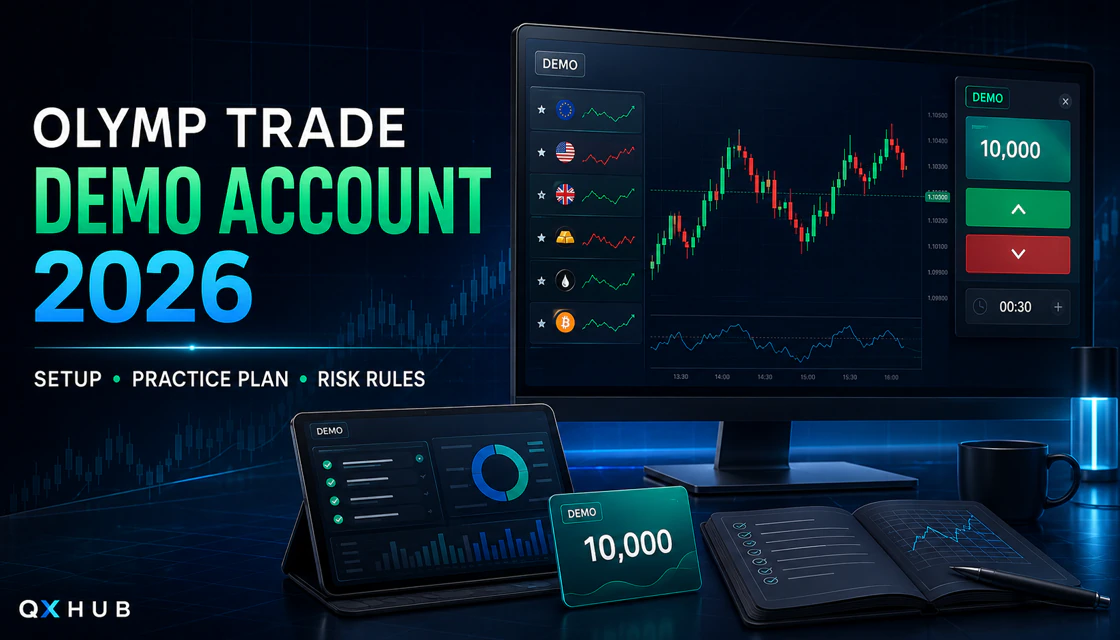
- Olymp Trade currently describes a free demo environment with 10,000 refillable virtual units, real-market conditions and access to the platform's trading tools; virtual funds and results cannot be withdrawn.
- Practise Fixed Time and Forex-style modes with separate written rules. Use one asset, a fixed virtual risk unit and a documented twenty-trade sample that scores process quality rather than virtual profit alone.
- Demo results do not reproduce the pressure of real money or prove country access, live execution, KYC, payment reliability or profitability. Stay on demo—or do not use the platform—until every readiness and affordability check is clear.
Quick Answer: What the Demo Account Is For
The Olymp Trade demo account is a practice environment funded with virtual currency. Olymp Trade’s official demo page currently states that it includes 10,000 units of refillable demo currency, uses real market conditions, and offers the platform’s trading instruments and functionality. That makes it useful for learning controls and rehearsing a written process without putting personal funds at risk.
The word “risk-free” applies only to the virtual balance. It does not mean the underlying products are safe, that a strategy is proven, or that live trading will feel identical. Fixed Time trades can lose the full amount committed to a prediction, while Forex-style modes add execution, multiplier, stop-loss, and market-risk decisions. Availability, assets, modes, minimums, and account conditions vary by country and can change.
The correct objective is not to grow the 10,000-unit balance. It is to collect evidence about your process: whether you can identify the account mode, wait for a setup, use a fixed training amount, avoid accidental clicks, respect a session stop, and review decisions honestly.
| Useful for | Not proof of |
|---|---|
| Learning platform controls and account mode | Future profitability or a reliable win rate |
| Testing one setup under written rules | Identical emotions or execution with real funds |
| Practising stake, time, exit, and stop rules | Easy withdrawals, country eligibility, or KYC approval |
| Comparing browser, desktop, and mobile workflow | Regulatory protection or suitability for every user |
Who the Olymp Trade Demo Account Suits
- Complete beginners who need to learn the asset selector, chart, indicators, mode switch, amount, duration or exit controls, trade history, and demo/real balance switch.
- Traders comparing Olymp Trade with another broker and wanting a common test for usability, available modes, chart tools, stability, and risk controls.
- Existing users rehearsing one new setup, asset, market session, indicator combination, or device workflow before considering real capital.
- Anyone prone to overtrading who needs a controlled environment for skip decisions, session limits, and post-trade review.
When to skip the platform entirely
- The service or a specific product is restricted where you live, or you cannot identify the entity that would hold your account.
- You need exchange-traded ownership, retirement investing, or a locally regulated securities account rather than speculative price contracts.
- You are under 18, would use another person’s documents or payment method, or would need borrowed money.
- You feel pressured by a bonus, status tier, signal group, recovery promise, or a desire to win back previous losses.
- You cannot verify the official domain, read the current terms, or identify an acceptable support and withdrawal route.
Current Demo Features Verified on 24 August 2026
Olymp Trade’s marketing pages currently mention multiple modes, including Fixed Time, Forex, Stocks, and Flex in some site sections. Do not assume every mode is available in every country, account, device, or demo session. The authenticated platform is the operational source; local law and account terms remain decisive.
| Feature | Official public description | Practical interpretation |
|---|---|---|
| Virtual balance | 10,000 units of refillable demo currency | Useful for repeated practice; not withdrawable money. |
| Market environment | Official pages describe real market conditions and live price movements | Quotes can train observation, but live execution and emotion still differ. |
| Functionality | Official demo page says the same functionality as a live account | Your region and account may still show different assets or modes. |
| Instruments | Official page advertises the platform’s trading instruments | Record what your own account actually displays today. |
| Support | Official site advertises 24/7 support | Use only signed-in chat or official contact routes. |
How to Open and Secure Demo Access
- Type the official olymptrade.com domain yourself or use a trusted bookmark. Avoid advertisements, cloned login pages, unofficial APK sites, and social-media links.
- Choose Open demo account, Try for free, or the current practice route. Confirm the balance is explicitly marked Demo before touching an order control.
- If registration is requested, use accurate information, a unique password, and an email address you control. Do not create multiple accounts to bypass restrictions.
- Enable the strongest authentication available and secure the associated email. Do this before any consideration of real funding.
- Record the demo balance, visible modes, available assets, displayed return or fee information, and device version. Conditions may be account- and region-dependent.
- Take one orientation screenshot without personal data. Label the mode switch, asset, chart, amount, time or exit controls, result history, and demo/real selector.
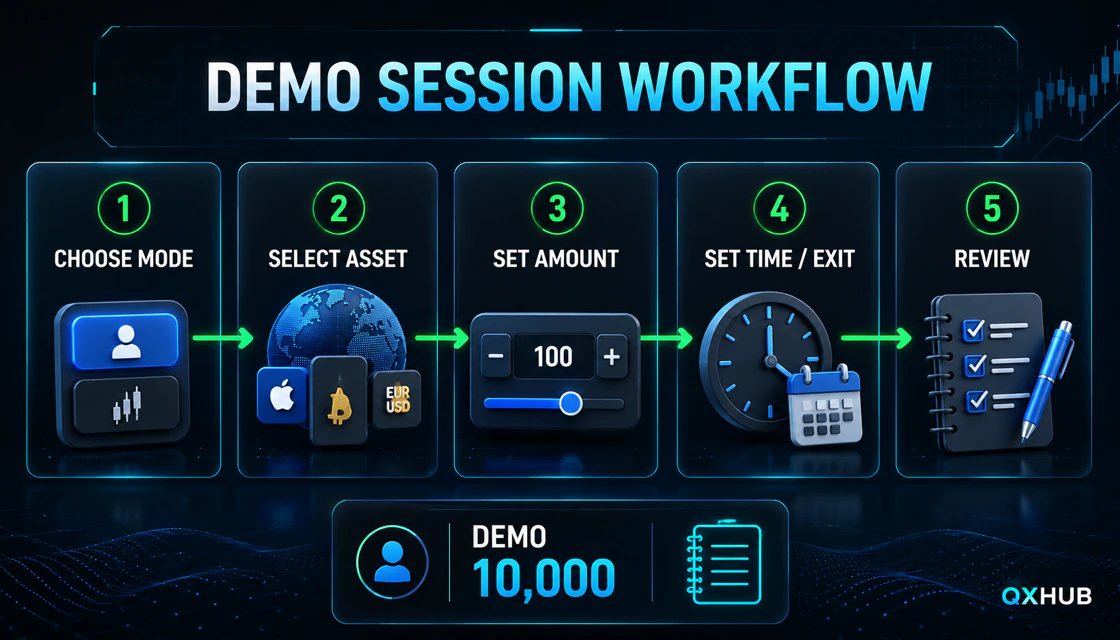
Demo Session Workflow: From Mode to Review
1. Confirm the account and trading mode
Begin every session by saying or writing “demo.” Then identify the mode. Fixed Time, Forex-style, stock, or other available modes use different order logic and risk. Never transfer a duration rule from Fixed Time into a mode where the trade closes by price, stop-loss, or manual exit. Keep each mode in a separate journal sample.
2. Select one asset and market session
Use one familiar, liquid asset for the first practice block. Record whether the market is open, whether the instrument is OTC, and whether the feed is behaving normally. Weekend and OTC pricing should not be mixed with regular-session observations because the market structure and displayed conditions can differ.
3. Pre-set amount and risk unit
The amount must be chosen before the entry appears. An oversized virtual balance encourages unrealistic stakes, so create an imagined training bankroll and risk a small fixed fraction—commonly 0.5% to 1% for simulation. The exact percentage is less important than keeping it unchanged throughout the sample.
4. Set duration or exit logic
For Fixed Time, define duration and expiry logic before clicking. For Forex-style practice, define entry, invalidation, stop-loss, take-profit or manual-exit conditions before opening a position. If you cannot state the exit rule in one sentence, the setup is not ready.
5. Review the process, not only the result
A winning rule-break is a bad practice trade. A losing decision that followed every rule may still be useful evidence. Record the setup, screenshot, reason, mode, amount, exit logic, displayed conditions, outcome, and whether each rule was followed.
Fixed Time and Forex Demo Need Separate Rulebooks
Never combine the win rate from one mode with results from another. The payoff, duration, execution, and error types are not comparable. If the interface offers additional modes, create a separate plan before testing them.
| Decision | Fixed Time practice | Forex-style practice |
|---|---|---|
| Primary outcome | Direction at a defined expiry | Price movement until close, stop, target, or manual exit |
| Key pre-trade field | Amount, direction, and expiry | Volume/amount, direction, multiplier if shown, stop, target |
| Common beginner error | Choosing duration after the signal | Moving the stop or increasing exposure after entry |
| Review metric | Rule compliance plus displayed return | Rule compliance plus planned risk-to-reward and exit quality |
| When to skip | Unclear timing, unstable return, news shock | Wide/unclear conditions, no invalidation, oversized risk |
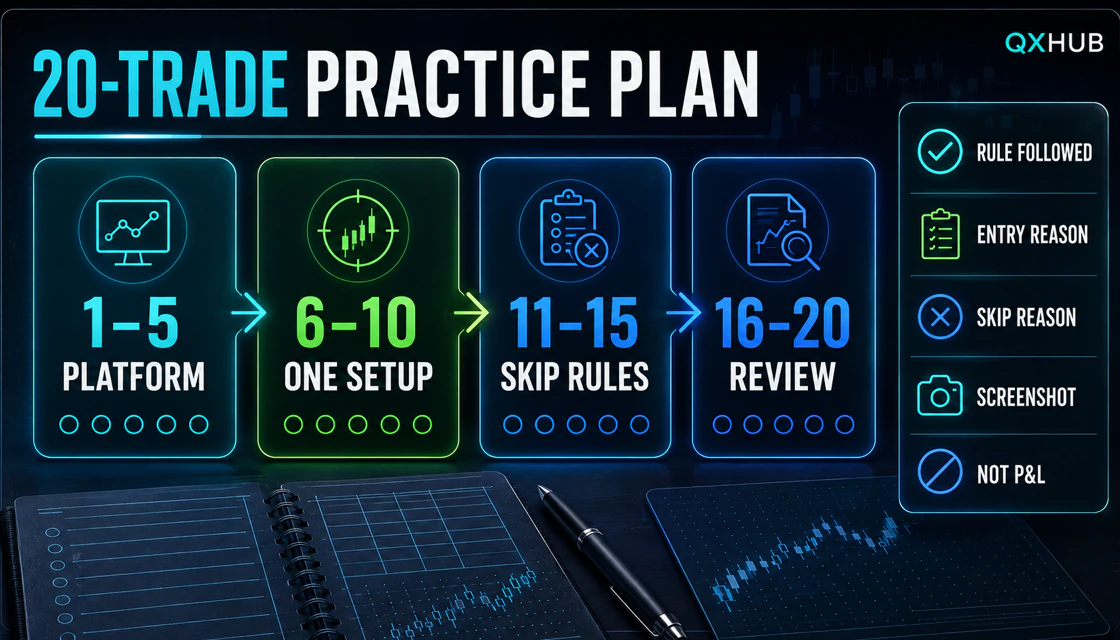
A Practical 20-Trade Demo Practice Plan
Use one mode, one asset group, one setup, one risk unit, and one journal format for the entire sample. Twenty trades are not enough to prove an edge; they are enough to expose interface errors, impulsive changes, weak definitions, and missing stop rules.
Trades 1–5: platform accuracy
- Identify demo mode, trading mode, asset, amount, and exit or expiry before every attempt.
- Use no more than one simple indicator plus price structure.
- Find each completed trade in history and save the required journal fields.
- Stop immediately after a wrong-mode, wrong-amount, wrong-direction, wrong-expiry, or accidental-real-account error.
Trades 6–10: repeat one setup
Choose an observable setup such as a trend pullback that requires a closed-candle confirmation at a defined level. Write the trend filter, location, trigger, invalidation, and skip rule. Do not add indicators or change duration after a loss. If the setup is absent, waiting is the correct decision.
Trades 11–15: practise skipping
- Skip scheduled high-impact news that overlaps your planned holding period.
- Skip a frozen chart, unstable connection, delayed data, or abnormal gaps.
- Skip when the displayed Fixed Time return changes enough to alter the break-even requirement.
- Skip OTC unless OTC is a separate test with its own journal tag and rules.
- Skip after two emotional impulses or two rule breaks, even if the virtual balance is higher.
Trades 16–20: repeat and audit
Repeat without changing the setup. At trade twenty, calculate rule compliance, interface-error count, correct-skip count, and stop-rule compliance. Review screenshots in sequence. Profit and loss can be recorded, but it is not the pass condition because a short favorable run can hide a weak process.
Worked Example: Break-Even Math for Fixed Time
Assume the platform displays an 80% return and the virtual amount is $10. A correct prediction earns $8; an incorrect prediction loses $10. The break-even win rate is 1 ÷ (1 + return rate).
Never respond to a lower return or a loss by doubling the next amount. Martingale changes the risk distribution and can exhaust an account after a short losing sequence. The correct response to changing conditions is to recalculate, reduce exposure, or skip.
| 20-trade sample | Wins / losses | Net at $10 | Lesson |
|---|---|---|---|
| 50% win rate | 10 / 10 | $80 − $100 = −$20 | Equal wins and losses are negative at an 80% return. |
| 55% win rate | 11 / 9 | $88 − $90 = −$2 | Still slightly below break-even. |
| 60% win rate | 12 / 8 | $96 − $80 = +$16 | Positive short sample, not proof of a durable edge. |
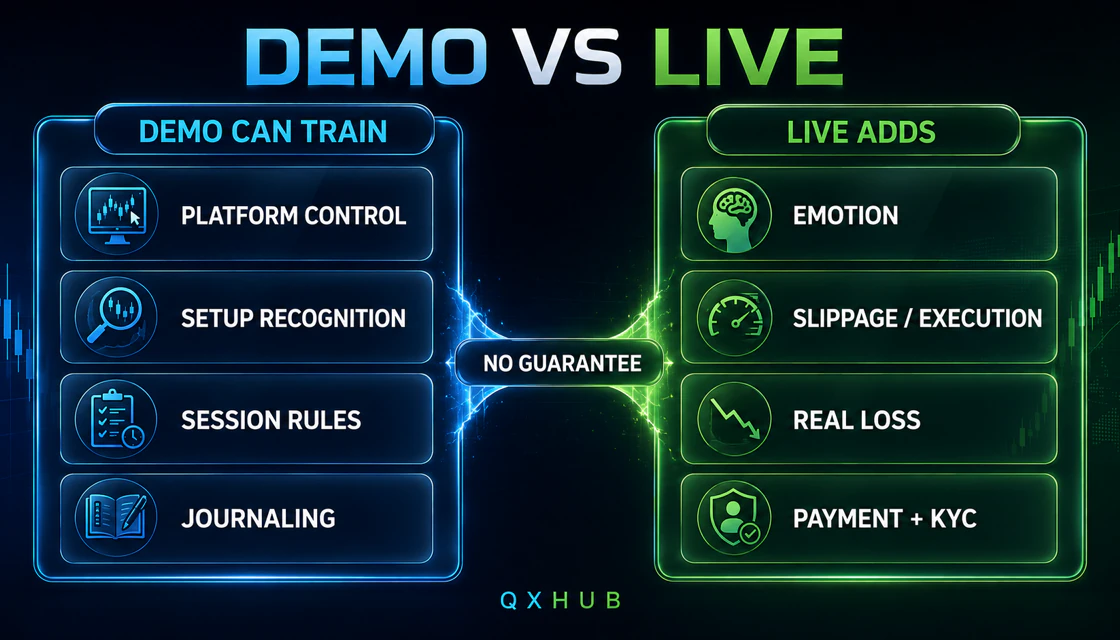
Demo vs Live: What Changes
- Real loss changes attention and decision speed. A trader who is calm with virtual units may chase, freeze, or increase size with real money.
- Live execution and account conditions can differ. Asset availability, return, spread, multiplier, latency, and market status can vary by time and account.
- Payments introduce ownership, currency conversion, provider, bonus, verification, and withdrawal-route rules that demo does not test.
- Country access and legal protection matter only when the real contract is identified. Access to a demo page does not establish local permission.
- A strategy that appears successful over twenty or even one hundred demo trades can still fail later because markets change and samples contain luck.
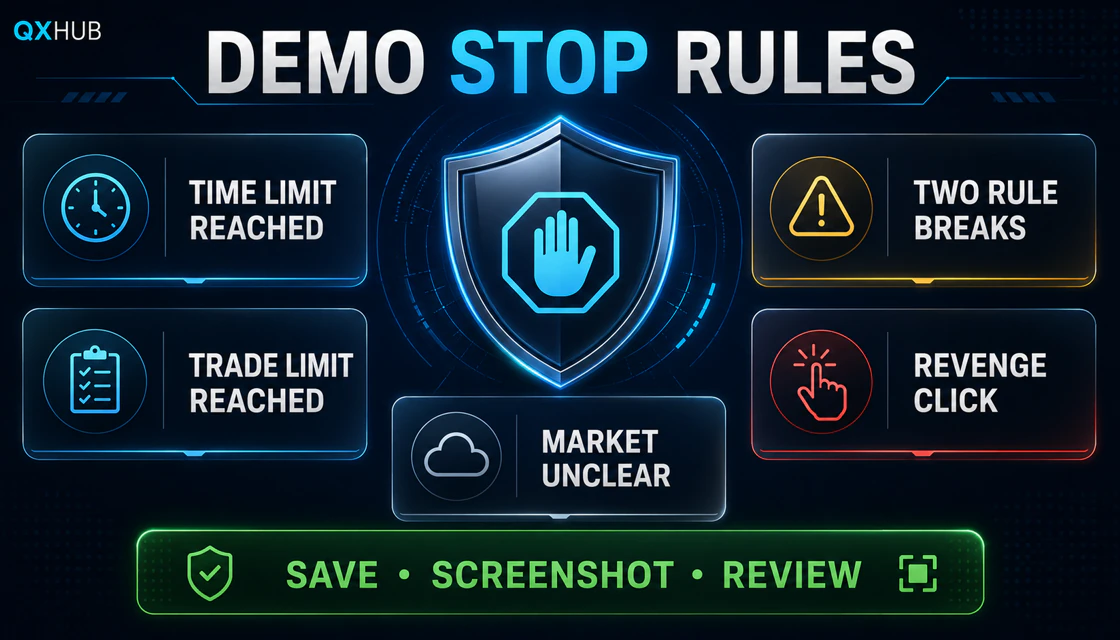
Risk Management and Demo Stop Rules
- Set a time limit and a valid-trade limit before opening the chart; stop when either is reached.
- Use one fixed training risk unit. Do not size from the full 10,000-unit demo balance.
- End the session after two rule breaks or one accidental order-control mistake.
- No revenge clicking. A new trade needs a new complete setup, not frustration from the previous result.
- Pause during major news, unstable connections, frozen feeds, unclear market status, or unexplained interface behavior.
- Save the screenshot and journal before analysing the next opportunity. Missing records are a signal to slow down.
Common Beginner Mistakes
- Treating the refillable balance like a score and increasing virtual stakes after wins.
- Switching between Fixed Time and Forex-style modes without separate rules.
- Choosing the highest displayed return instead of one stable asset and session.
- Changing duration, indicator settings, or exit rules after every result.
- Counting lucky rule-breaks as evidence that a strategy works.
- Mixing OTC and regular market data in one sample.
- Practising without screenshots, skip notes, or a session stop.
- Assuming demo access means the platform is legal, suitable, or regulated in the user’s country.
- Installing unofficial apps or sharing credentials with a signal seller or “account manager.”
- Moving to live because of confidence rather than measured rule compliance.
Troubleshooting the Demo Account
| Problem | Safe checks | When to stop |
|---|---|---|
| Demo balance not visible | Confirm the account selector, sign in again, refresh, and use the official demo route | Stop if the interface cannot clearly distinguish demo from real. |
| Balance is low | Look for the official refill/reset control; virtual funds should not require payment | Stop if anyone asks for money or credentials to refill demo. |
| Asset or mode missing | Check market hours, country/account availability, app version, and official announcements | Do not use a VPN to bypass restrictions or assume a feature is universal. |
| Chart frozen or delayed | Check connection, reload, compare timestamp, and contact official support if persistent | Do not trade while price or order controls appear unreliable. |
| Cannot log in | Use official password recovery, secure email, and signed-in support | Do not create duplicate accounts or use social-media recovery agents. |
Demo Practice Task: One Complete Session
- Choose one available mode and one asset. Write why that pair is suitable for today’s practice.
- Set a 30-minute limit, a maximum of five valid trades, and one fixed virtual amount.
- Write one setup with five fields: context, location, trigger, invalidation, and exit or expiry.
- Take a clean pre-trade screenshot for every valid entry and one screenshot of a correct skip.
- After each result, score rule compliance from 0 to 5 before recording profit or loss.
- Stop at the first limit or after two rule breaks. Do not refill the balance during the session.
- Review all screenshots and write one interface lesson, one strategy lesson, and one behavior lesson.
When Not to Move to a Real Account
- You cannot maintain at least 80% rule compliance across several sessions.
- You changed the setup, asset, duration, or amount repeatedly to improve short-term results.
- You used martingale, revenge trades, oversized virtual positions, or bonus-driven decisions.
- You have not checked country access, current terms, KYC, payment ownership, fees, minimums, bonus rules, and withdrawals.
- You have not read the QXHUB Olymp Trade withdrawal guide or cannot identify the official support route.
- You feel urgency, excitement, financial pressure, or a need to recover money.
- The capital would come from rent, debt, emergency savings, or money you cannot afford to lose.
Summary
Olymp Trade’s official public pages currently present a free, refillable 10,000-unit demo account with real market conditions and broad platform functionality. Its professional use is narrow but valuable: learn controls, separate trading modes, repeat one written setup, practise skip decisions, and review behavior. It cannot validate country eligibility, live emotions, withdrawals, or future profitability.
A beginner should leave demo only after multiple sessions show accurate platform control, a stable rule set, fixed risk, documented decisions, and reliable stops. If a legal, payment, verification, or product question remains unclear, the right decision is to stay on demo or skip the platform.
Quick answers
Is the Olymp Trade demo account free?
Olymp Trade’s official demo page currently describes it as free and funded with refillable virtual currency. Confirm the current route on the official site in your country.
How much virtual money does the demo account include?
Official public pages state 10,000 units of refillable demo currency as of 24 August 2026. Your authenticated interface is the current operational source.
Can I withdraw demo profits?
No. Demo funds and results are virtual and are not withdrawable money.
Does demo use real market conditions?
Olymp Trade says the demo uses real market conditions and live price movements. That does not guarantee identical live execution, emotions, assets, or account conditions.
Can I refill the demo balance?
Official pages describe the demo currency as refillable. Use only the control inside the official platform; never pay anyone to reset virtual funds.
Can I practise Fixed Time and Forex in one account?
The platform advertises multiple modes, but availability varies. If both are present, keep separate rulebooks and journal samples because their order and risk logic differ.
How long should a beginner practise?
Use evidence rather than a calendar: complete at least twenty logged trades under one unchanged setup, then continue until platform errors are gone and rule compliance is stable across several sessions.
Can demo results guarantee live success?
No. Demo can train process, but it cannot reproduce real loss, emotional pressure, payments, KYC, or changing future markets.
Is Olymp Trade legal in my country?
Legality and availability vary by jurisdiction and product. Check the current contracting entity, terms, registration flow, and local regulator guidance. Demo access alone is not proof.
What should I check before depositing?
Verify country access, identity rules, payment ownership, current minimums and fees, bonus terms, withdrawal method, support route, and the amount you can afford to lose.
Next step
Choose a topic by task: brokers for platform selection, guides for access, strategies for setups, risk for discipline and investing for longer market logic.