Olymp Trade withdrawal
Olymp Trade Withdrawal Guide 2026: Methods, Verification, Time and Common Problems
Learn how an Olymp Trade withdrawal works in 2026: same-method rules, verification, available routes, current minimums, processing time, fees, statuses and troubleshooting.

Key points
- Use the same payment method used for the deposit, keep the payment owner and account details consistent, and complete requested verification before relying on a timeline.
- Separate Olymp Trade processing from bank, wallet or blockchain settlement; a platform status and the final credit are two different stages.
- Check the live minimum, method limits, fees, network and current account terms before submitting, and never pay a third party to unlock a withdrawal.
Quick Answer: How Do You Withdraw From Olymp Trade?
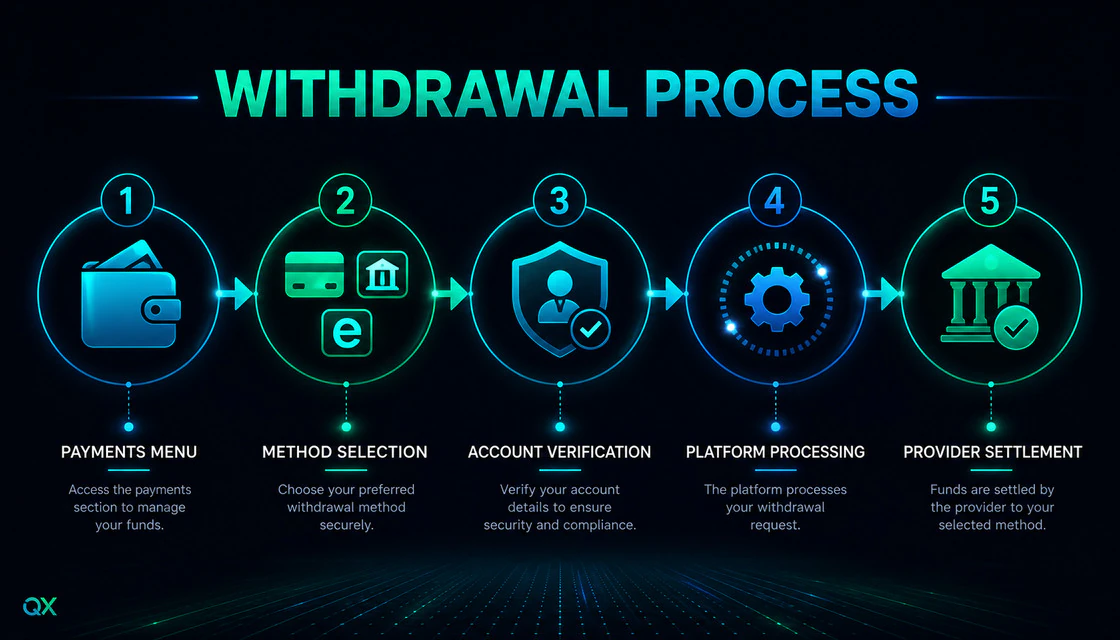
A withdrawal is not a single click followed by an instant bank credit. It is a chain of checks: your account data must match, the payment route must be available in your country, verification may need to be completed, Olymp Trade must approve the request, and the payment provider must then settle it. Understanding those stages prevents most avoidable mistakes and makes a genuine delay easier to diagnose.
This guide is broker-specific but not promotional. It explains the workflow using publicly available Olymp Trade help materials checked in August 2026. Payment methods, limits and account-status benefits can change by country, account currency and provider. Always treat the live Payments screen and current Client Agreement shown in your own account as the final source before moving money.
- Open Payments → Withdraw on the current platform interface.
- Enter an amount that fits the live minimum and maximum shown for your account.
- Choose an available route that complies with the same-method rule. Availability depends on country, account currency and deposit history.
- Confirm that the recipient name and payment details match your verified account information.
- Submit the request, complete verification if prompted, and track it in Operations → Withdrawals. Interface labels can vary, so use the withdrawal history shown in your account.
- Wait for both stages: Olymp Trade approval first, then the payment provider’s processing time.
Do not copy a method from a tutorial if it does not appear in Payments → Withdraw. The methods visible inside your account are the practical source of truth for your location and currency.
Before You Request a Withdrawal
The fastest troubleshooting happens before the request. Run this short readiness check instead of submitting first and investigating later.
- Use one real account in your own legal name. Names, date of birth and country data should be accurate.
- Use only payment instruments you own and can verify. Third-party cards, wallets or bank accounts create identity and ownership conflicts.
- Check whether Olymp Trade has requested identity or payment-method verification. Upload only through the official account flow.
- Review any active bonus. A turnover condition may restrict withdrawal or alter how bonus funds are treated.
- Confirm the live withdrawal minimum, maximum and provider-specific limit in Payments.
- Save the request amount, method, date, transaction ID and status. This record is essential if support must trace the payment.
- Secure the account with a unique password and protect the email account connected to it.
Verification: What Olymp Trade May Ask For
Olymp Trade distinguishes voluntary from mandatory verification. Its Help Center says mandatory verification must be started within 14 days of the notification, and trading access can be closed until the account is verified. Once documents are submitted, the platform says review normally takes no more than 24 hours but may take up to five business days in some circumstances. A withdrawal can therefore wait for a security check even when documents were not requested at registration.
Typical identity documents
- A valid passport, national identity card or driver’s licence, depending on the country and the request.
- Clear colour images with all document corners visible and details readable.
- Additional proof when an automated check cannot confirm the information.
Typical payment-method evidence
- Evidence that a bank card or account belongs to you. Sensitive card data should be hidden exactly as the official upload instructions specify.
- A bank statement for a non-personalised card when the platform requests ownership evidence.
- Wallet ownership or transaction evidence where an e-wallet or crypto route requires it.
Never send identity files to a stranger on social media or to an address copied from a comment. Start from the logged-in official platform and use the support contact displayed there. Reject any “agent” who asks for a fee, remote desktop access, seed phrase, one-time password or card PIN to release a withdrawal.
Withdrawal Methods: What Is Actually Available?
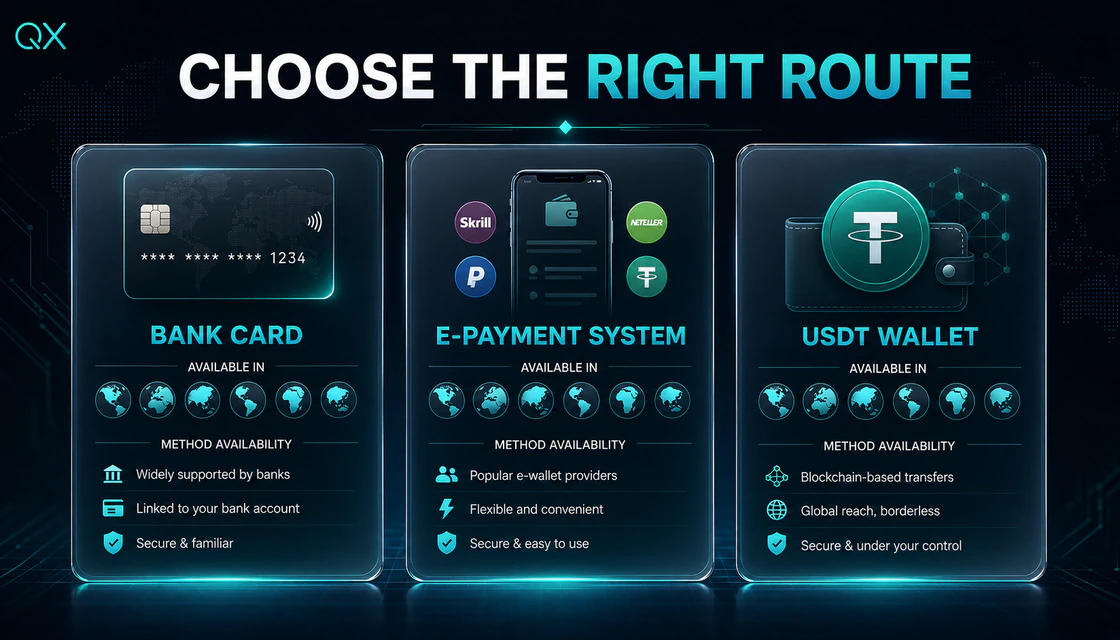
Olymp Trade’s help materials describe bank cards, bank accounts, e-wallets and crypto wallets as possible routes, but availability is regional. Published help pages also contain country-specific card and bank-account rules that have changed over time. That is why this article does not present one universal method list as a promise.
Olymp Trade's current withdrawal overview says to use the same payment method used for the deposit. If several methods funded the account, withdrawal amounts are allocated in proportion to those deposits; profit can be withdrawn through either of those used methods. Local availability and provider rules can still narrow the routes shown, so never invent an intermediary route because a preferred option is absent.
| Route | Best check | Common issue | Practical rule |
|---|---|---|---|
| Bank card | Is card withdrawal shown for your country? | Card deposits do not guarantee card withdrawal everywhere. | Use only your own previously used and verifiable card. |
| Bank account | Are local bank transfers supported? | Incorrect beneficiary or bank details. | Copy details from the bank app and recheck every field. |
| E-wallet | Is the wallet visible and previously funded? | Wallet ownership or currency mismatch. | Use an account registered in your own name. |
| Crypto wallet | Which asset and network are required? | Wrong network or address can cause irreversible loss. | Verify asset, network and address; use a small test when practical. |
How Long Does an Olymp Trade Withdrawal Take?
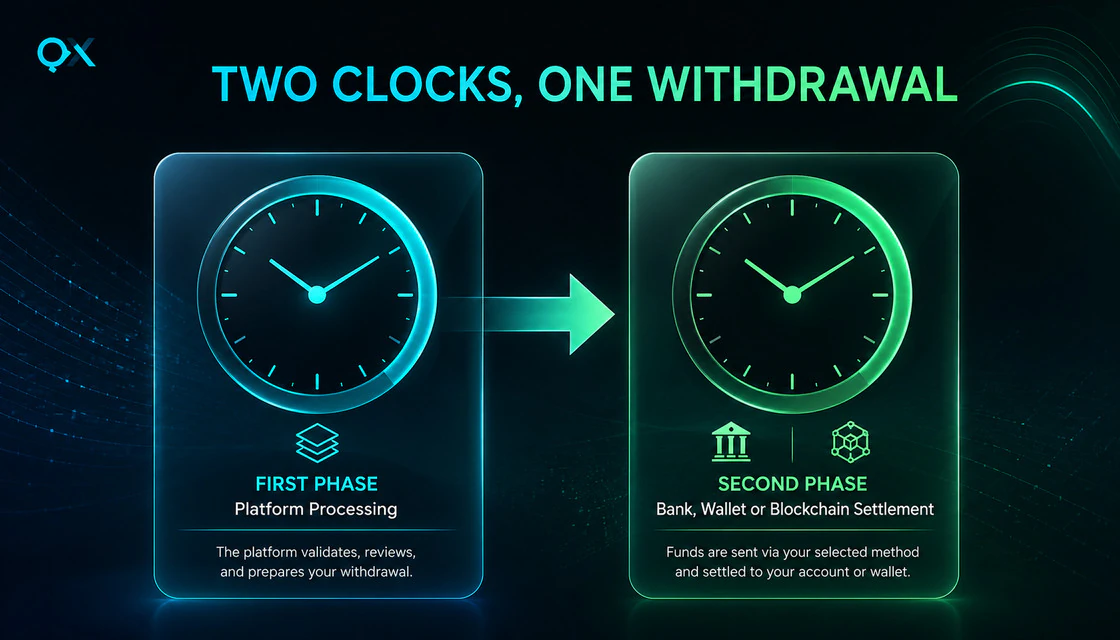
There are two clocks, not one. Olymp Trade first reviews and approves the request. After approval, the payment provider processes the transfer. A request can therefore leave the broker’s approval stage and still take time to appear in a bank or wallet.
Olymp Trade's current Help Center timing page reports 84% of requests processed within one hour, 93% within four hours, 97% within 24 hours and 99% within four days. After the platform sends the money, the payment method may take up to three business days to credit it; some method-specific pages show windows of up to five business days. These are platform-reported statistics, not guarantees. Use the maximum shown for your exact route and transaction.
| Stage | What happens | What to check |
|---|---|---|
| Approval | Account, verification, bonus and transaction checks. | Transaction History and any verification request. |
| Provider processing | Bank, card network, wallet or crypto provider settles the transfer. | Provider window, business days, holidays and transaction reference. |
| Credited | Funds appear in the destination account. | Recipient account history and correct currency/network. |
Understanding Withdrawal Statuses
Approving or Pending
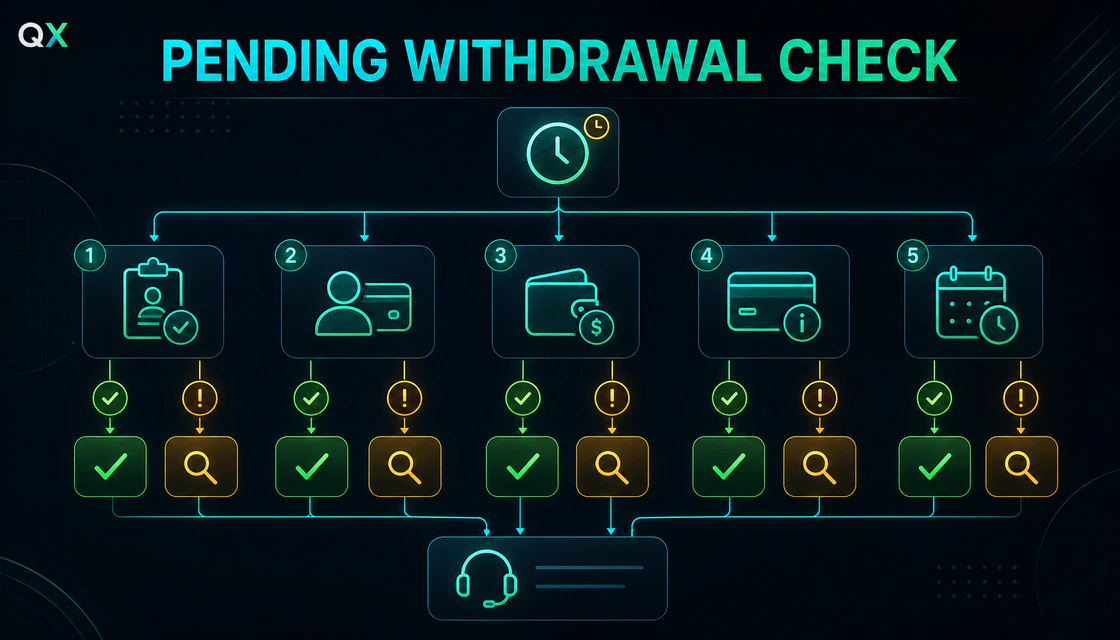
The request is still being checked by the platform. Look for an unfinished verification task, payment ownership issue, active bonus turnover or a request that exceeds a live limit. Do not submit multiple duplicate requests unless official support tells you to do so.
Processing or Approved
Olymp Trade has passed the request to the payment provider. At this point the bank, card network, e-wallet or crypto processor can be the remaining source of delay. Keep the transaction reference and wait through the stated provider window.
Completed
The platform records the transfer as sent. If the destination still shows nothing, check the correct account, statement date, currency and crypto network. Then ask official support for trace information that your provider can use.
Rejected or Failed
Read the stated reason before changing anything. Common causes include incomplete verification, mismatched recipient details, an unavailable route, an amount outside a limit, provider rejection or unresolved bonus conditions. Correct the specific cause; guessing can create a second failure.
Why an Olymp Trade Withdrawal May Be Pending or Rejected
- Verification has been requested but not completed, or an uploaded document is unreadable, expired or inconsistent.
- The payment method is owned by another person or the account name does not match.
- The selected route is not supported for the user’s country, currency or current provider configuration.
- The amount is below the live minimum, above a provider cap or above a daily, weekly or monthly account limit.
- An active bonus has a turnover condition that has not been satisfied or resolved.
- Bank holidays, weekends, maintenance or a payment-provider review extend settlement time.
- Crypto asset, address or network details are incompatible.
- Security controls detect unusual login, payment or account activity and trigger an additional review.
Troubleshooting Workflow
- Locate the transaction in Operations → Withdrawals, or the withdrawal history label shown in your interface. Record its status, amount, method, creation time and transaction ID.
- Identify the phase. Approving/Pending points to the platform review; Processing/Approved points to the provider stage.
- Open the verification area and finish only the tasks explicitly requested. Do not repeatedly upload different documents without reading the rejection reason.
- Compare the recipient name and payment details with the verified account. For crypto, recheck the asset and network—not only the address.
- Review the bonus page and current terms. If a turnover condition is active, do not assume it can be bypassed by changing methods.
- Compare elapsed time with the maximum shown for the transaction, counting business days correctly.
- If the displayed maximum has passed, contact support through the logged-in platform. Provide the transaction ID, method, amount, date, status and screenshots that do not reveal passwords or secret credentials.
- After Olymp Trade confirms the transfer was sent, ask for trace details and contact the destination provider with the same transaction record.
A Worked Example
Imagine that Maya submits a withdrawal to a supported e-wallet on Monday. Transaction History first shows Approving. She checks that the wallet is in her name, completes the requested identity check and saves the transaction ID. On Tuesday the status changes to Processing. That status change matters: the request is no longer waiting for the same approval task. Maya now checks the provider’s stated window rather than uploading her ID again.
If the funds have not arrived after the maximum provider window shown for that transaction, Maya contacts official support with the ID, amount, method and dates. She does not create three duplicate requests, switch to a stranger’s wallet or pay an “agent” to accelerate the transfer. The example is simple, but it demonstrates the most useful rule in withdrawal troubleshooting: diagnose the current stage before choosing the action.
When You Should Not Request a Withdrawal Yet
- Your account name or country information is wrong and must be corrected through official support.
- You are using someone else’s card, bank account or wallet.
- You cannot verify ownership of the deposit method.
- You do not understand an active bonus or turnover condition.
- The only offered method requires a crypto network you cannot confidently verify.
- You are reacting emotionally after losses and are about to move money without checking details.
- A person outside the official platform is directing you to a new wallet or requesting an extra payment.
Risk Management Around Deposits and Withdrawals
Withdrawal planning begins before the first deposit. Choose a funding method you own, can verify and can access for the long term. Keep records of deposits, withdrawals and support conversations. Set a fixed maximum trading allocation that is separate from emergency money. Never increase a deposit merely to satisfy an alleged withdrawal requirement communicated outside official terms.
For short-duration trading, a conservative process matters more than account status or faster approval marketing. Use fixed risk per trade, a hard daily loss limit and a session stop. If you cannot follow those rules on demo, the next task is not another deposit—it is more structured practice.
Demo Practice Task: Learn the Process Without Moving Money
A demo account cannot produce a real withdrawal, but it can train the operational discipline that prevents expensive errors. Complete this 20-minute exercise:
- Open the platform and locate Payments, verification, Transaction History and official support without submitting a payment.
- Write down the payment methods and live limits visible for your country and account currency.
- Create a mock withdrawal record with amount, method, date, status and transaction ID fields.
- Run three scenarios: Pending during approval, Processing at the provider, and Rejected for a name mismatch.
- For each scenario, write one correct next action and one action to avoid.
- Finish by setting a personal rule: no deposit through a method you cannot later verify.
Beginner Mistakes to Avoid
- Treating a published average as a guaranteed arrival time.
- Ignoring the difference between business days and calendar days.
- Using a relative’s card or wallet because it is convenient.
- Submitting duplicate requests while the first is still active.
- Uploading documents to unofficial contacts.
- Assuming every country has the same bank-card options.
- Entering a crypto address without checking the network.
- Accepting a bonus without reading withdrawal conditions.
- Judging platform safety only by one successful or delayed withdrawal.
Final Withdrawal Checklist
- Official site and logged-in Payments used
- Real account and available balance confirmed
- Identity and payment owner names match
- Verification tasks completed
- Bonus terms checked
- Method available for country/currency
- Live minimum and maximum checked
- Bank or wallet details rechecked
- Crypto network verified, if applicable
- Transaction ID and screenshots saved
- Business-day window recorded
- Official support route identified
Summary
A clean Olymp Trade withdrawal follows a predictable logic: verify the account, use an eligible same-method route actually available in Payments, submit accurate details, separate platform approval from provider settlement, and keep a transaction record. Most useful troubleshooting begins by identifying the current status rather than guessing at the cause.
Because payment routes and limits are country-specific and can change, use this guide as a decision framework—not as a substitute for the live terms in your account. If the maximum displayed window has passed, escalate through official support with a complete record and never pay a third party to “release” funds.
Quick answers
What is the minimum Olymp Trade withdrawal?
Olymp Trade’s public withdrawal guide says the minimum starts from $10 or the local-currency equivalent, while its USDT FAQ lists a ₮5 minimum. The live minimum depends on the route, account currency and region, so the Payments screen is the final current rule.
How long does an Olymp Trade withdrawal take?
The request first goes through platform processing and then provider settlement. Olymp Trade’s general Help Center page reports 97% processed within 24 hours and 99% within four days, then says crediting may take up to three business days depending on the method. Some method-specific pages show longer windows. Your transaction screen is the final current reference.
Can I withdraw without verification?
Olymp Trade may allow account use before a verification request, but withdrawals can be restricted once verification is required. Complete only the checks shown in the official account flow.
Can I withdraw to a different card or wallet?
Normally no. Olymp Trade's current rule is to withdraw through the same method used to deposit. When several methods funded the account, withdrawals are allocated proportionally; profit can use either previously used method. The route must also be available and owned by you.
Why is my withdrawal pending?
Pending usually means the request remains in approval. Check verification, payment ownership, active bonus terms, limits and the approval window shown in Transaction History.
What if the status is completed but I have no funds?
Confirm the destination account, currency and network. Ask official support for trace details, then give those details to your bank or wallet provider.
Can I cancel a withdrawal request?
Do not assume a submitted request can be cancelled. Check the current Operations or Payments interface and contact official support before changing the available balance or submitting another request.
Does Olymp Trade charge a withdrawal fee?
Olymp Trade’s public withdrawal page says most withdrawals have no platform fee, but it lists network charges for USDT and commissions for cryptocurrency, and notes that fees may apply to certain non-trading activity or multiple-account patterns. Banks, wallets and currency conversion can add their own costs. Verify the current method screen.
Is a faster account status a guarantee?
No. A shorter target for platform approval does not remove verification or payment-provider processing, and it does not reduce trading risk.
Who should I contact after a long delay?
Use support inside the logged-in official platform. Include the transaction ID, date, amount, method and status. Never share a password, OTP, card PIN or seed phrase.
Next step
Choose a topic by task: brokers for platform selection, guides for access, strategies for setups, risk for discipline and investing for longer market logic.