Pocket Option demo account
Pocket Option Demo Account 2026: $50,000 Practice Guide
Learn how the Pocket Option demo account works with a $50,000 virtual balance, a 20-trade practice plan, payout math, risk rules and live-account readiness checks.
Key points
- Pocket Option currently describes a free demo environment with a $50,000 virtual balance, but product access and platform conditions still need a current country-specific check.
- Use one asset, one written setup and one stake unit for a documented 20-trade sample; score rule adherence, skip decisions and payout-aware results rather than virtual profit alone.
- Demo performance cannot prove live execution or emotional readiness. Keep practising—or avoid the platform—whenever legality, account entity, payout terms, verification or affordable maximum loss remain unclear.
Pocket Option demo account: the short answer
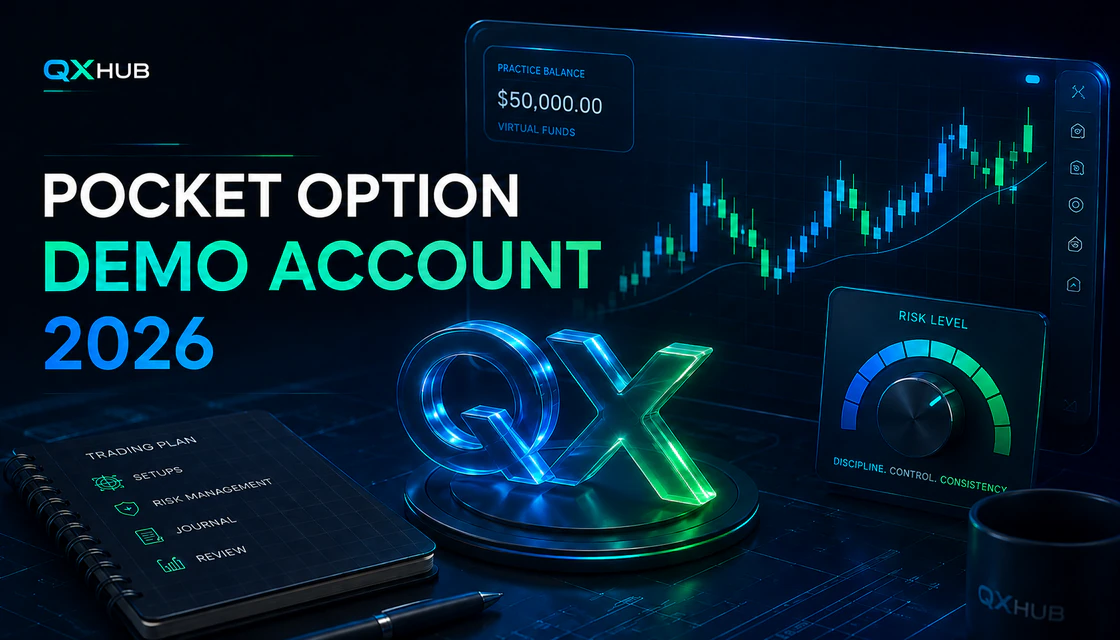
Pocket Option provides a free demo environment with a virtual balance advertised at $50,000. The official demo route can be opened from the platform, and Pocket Option says the balance can be replenished when it falls below $50,000. The purpose is to learn the terminal, practise trade mechanics and test written rules without depositing real money. It is not proof that a strategy works, and virtual profit cannot be withdrawn.
The strongest use of the demo is not exploring every feature. It is making the environment deliberately narrower: one liquid asset, one setup, one virtual stake, one expiry rule and a journal for a minimum sample of 20 trades. This guide gives that workflow, explains how demo differs from live trading, and shows when the correct decision is to stay on demo or avoid the platform entirely.
What the Pocket Option demo account includes
Pocket Option’s official demo article states that the account starts with $50,000 in virtual funds, has no stated time limit and can be topped up manually. The company describes access to charts, assets, indicators, drawing tools and trading signals. The current live platform is the final authority because product access, assets, payout percentages and interface controls can change by session, account and region.
Feature lists around social trading, tournaments, MetaTrader routes or rewards should be checked inside the current account before publication or use. They may differ between demo and live modes and may change without notice. A good educational guide focuses on durable decisions: asset, setup, amount, expiry, evidence and risk.
| Demo element | What it is useful for | What it cannot prove |
|---|---|---|
| $50,000 virtual balance | Learning buttons, order timing and record keeping without a deposit. | That the same stake size is sensible for your future real balance. |
| Live-style charts and quotes | Observing price movement, candles, timeframes and expiry mechanics. | That every demo quote or execution experience will match a live trade. |
| Indicators and drawing tools | Practising one repeatable setup and marking levels. | That more indicators improve accuracy. |
| Balance refill | Continuing practice after the virtual balance falls below the refill threshold. | That losses can be reset psychologically or financially in live trading. |
| Fast demo/live switching | Comparing workflow and checking which account mode is active. | That you are emotionally ready to risk money. |
Availability and country restrictions
A demo account does not override local law or the broker’s country rules. Pocket Option’s current Public Offer lists the United States, Canada and many European countries as restricted. The official site also displays regional warnings that services are not provided to residents of the EEA, the United States, Israel, the United Kingdom, the Philippines, Japan and Brazil. Because different official pages can display different or updated coverage, users must check the current Public Offer, registration screen and local law before creating an account.
- Do not use a VPN, false address or borrowed identity to bypass a country restriction.
- Do not assume demo access means a real account, deposit, trade type or withdrawal route is permitted.
- If your country or intended product is restricted, stop at education and use a locally permitted alternative.
How to open and access Pocket Option demo
Quick demo access
- Open the official Pocket Option domain and verify the address before entering any data. Avoid look-alike pages, social-media links and unofficial APK files.
- Choose the official demo route. Pocket Option currently exposes a “Try Demo” experience that introduces the chart, asset menu, account balance, trade time and direction controls.
- If the platform asks you to register for persistent access, use your real details, an email you control and a unique password. The Public Offer prohibits more than one trading account per client.
- Open the balance selector and confirm that Demo, not Real, is active before every practice session.
- Take a screenshot of the blank workspace and record the starting virtual balance. This becomes the baseline for your practice journal.
Demo login and account switching
After registration, sign in only through the official domain or verified app. The balance selector is the critical control: confirm the account label and virtual balance before placing a trade. Switching is easy, which makes a mode mistake possible. Build a two-second habit: read “Demo,” read the balance, then say the planned stake aloud before clicking.
If login fails, do not create another account. Use password recovery, check email access and use official support. Repeated registrations can conflict with the one-account rule and create verification or withdrawal problems later.
How to reset or replenish the demo balance
Pocket Option’s official demo guidance says the virtual balance can be replenished when it is below $50,000. Open the demo balance control and use the available replenish or refill action. The exact button name and location can change with interface updates. If the option is not visible, confirm that the account is in demo mode and that the balance is below the threshold, then refresh or reopen the platform.
Do not reset automatically after every losing session. First export or record the result, screenshot the balance, identify rule violations and write what changes in the next sample. A refill without review teaches the wrong lesson: that losses disappear when they become uncomfortable.
Understand the trading screen before forecasting
Pocket Option’s Public Offer describes High-Low contracts in which the client chooses an instrument, expiry, amount and Call or Put direction. The displayed payout is set for the specific operation. If the closing price equals the opening price, the contract is treated as unexecuted and the fixed amount is returned under the current wording. Terms can change, so the live contract specification and Public Offer remain authoritative.
| Control | Question to answer before use | Common beginner error |
|---|---|---|
| Account mode | Does the selector clearly show Demo? | Accidentally trading a live balance after switching. |
| Asset | Is this the exact market and session you planned? | Choosing a similar symbol or OTC instrument without noticing. |
| Chart/timeframe | Does the candle timeframe fit the setup? | Changing timeframe until the chart confirms a guess. |
| Payout shown | What is the current return on a winning trade? | Ignoring how payout changes the break-even win rate. |
| Stake | Is the virtual amount tied to a realistic future risk unit? | Using huge demo stakes because the balance is large. |
| Expiry/trade time | Is the close time written before entry? | Changing duration emotionally after seeing one candle. |
| Direction | What observable condition supports higher or lower? | Clicking from instinct, signal pressure or recent result. |
| Trade history | Can you match the result to a journal row? | Reviewing only wins and losses, not decision quality. |
Demo versus live: the psychological gap
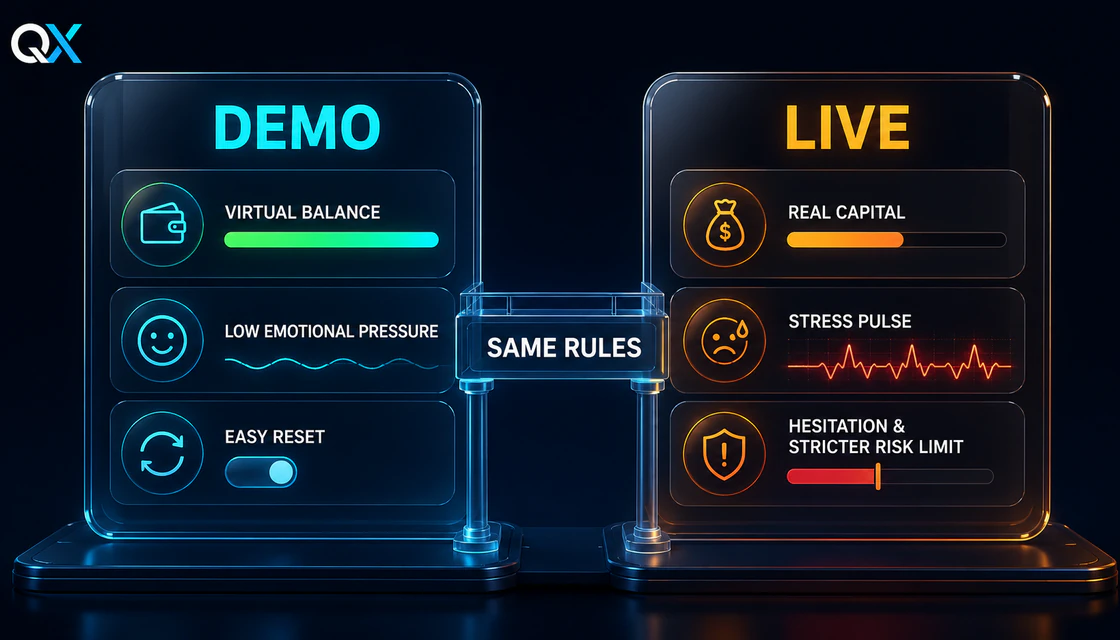
The interface may look similar, but real capital changes pressure, hesitation and risk perception.
Demo removes financial loss, but it also removes much of the emotional information that shapes live behavior. A trader may wait patiently in demo and then enter early with real money. A virtual losing streak can be ignored; a real losing streak can trigger revenge trading. A virtual balance can be refilled; a real account cannot be reset without adding more capital.
The solution is not to imitate fear. It is to keep rules identical. Use a realistic stake unit, cap the number of trades, stop after the same loss limit and journal every decision. If you would not risk 5% of a real account on one trade, do not practise with 5% of demo. The large $50,000 balance is a tool budget, not permission to oversize.
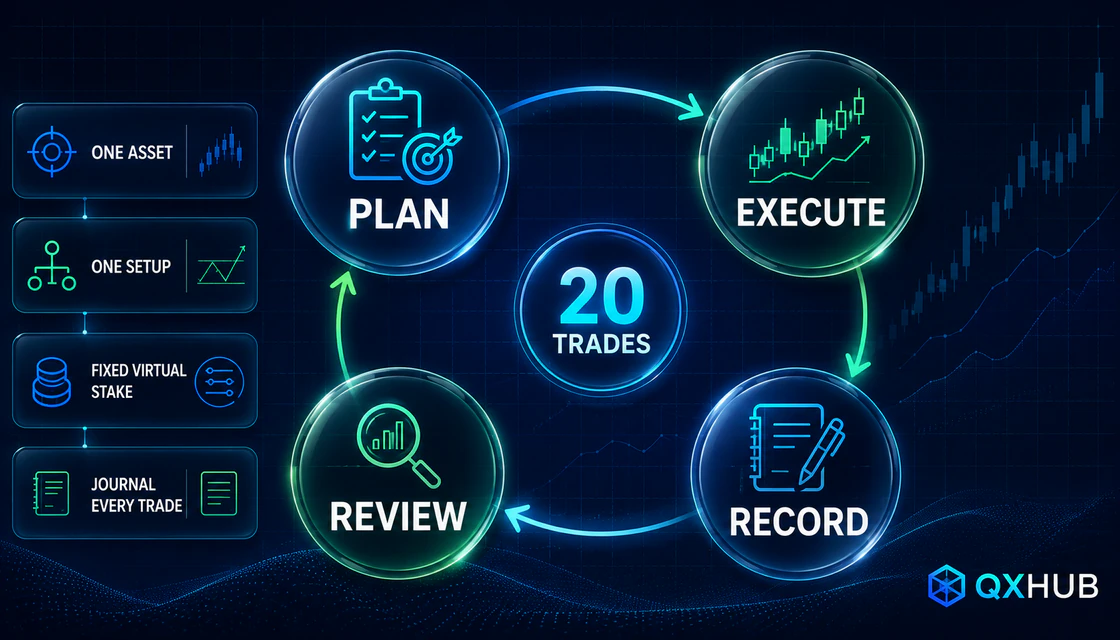
The QXHUB 20-trade Pocket Option practice plan
A useful demo sample cycles through planning, execution, recording and review.
Twenty trades are not enough to prove a durable edge, but they are enough to expose whether the rules are clear and whether you can follow them. Run the sample on one asset and one setup. Do not change indicators, expiry logic or stake halfway through. If the setup is invalid, record “skip” instead of manufacturing an entry.
Phase 1 — terminal control: trades 1–4
- Use one asset during a liquid session. Learn the asset selector, chart controls, amount, expiry and history.
- Place the smallest realistic virtual stake. The objective is operational accuracy, not profit.
- For each trade, record planned direction, entry condition, expiry, displayed payout and result.
- Pass only if there are zero account-mode, asset, amount or expiry mistakes.
Phase 2 — one setup: trades 5–12
- Define the setup in one sentence: context, trigger and invalidation. Example: trend pullback to a marked zone followed by a completed rejection candle.
- Use the same candle timeframe and expiry rule for all eight trades.
- Take a screenshot immediately before entry. Do not move the rule after seeing the outcome.
- Score execution A, B or C: A followed every rule; B had one minor timing issue; C was impulsive or invalid.
Phase 3 — skip discipline: trades 13–16
- Create four observation windows. A window can end with no trade.
- Skip if payout is below your tested threshold, the setup is incomplete, news risk is near, the chart is unclear or the session limit is reached.
- Record a correct skip as a successful decision, not a missed profit.
Phase 4 — repeatability: trades 17–20
- Repeat the original rules without adding filters after losses or removing filters after wins.
- End the session at the written trade limit even if the next candle looks attractive.
- Review process score, rule violations, payout-aware result and emotional notes separately.
- If any C-grade trade appears, repeat a new 20-trade sample before considering live money.
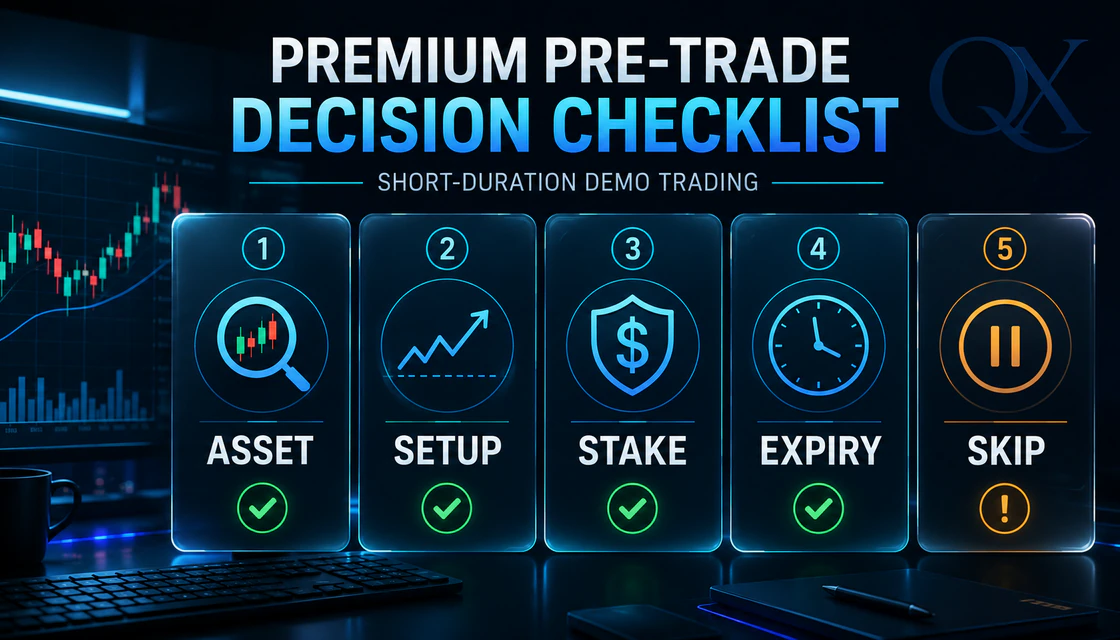
Pre-trade checklist and when to skip
A valid demo trade needs a planned asset, setup, stake and expiry; otherwise skip.
- Asset: the symbol and market type match the written plan; you have not confused regular and OTC trading.
- Setup: context, trigger and invalidation are visible on completed candles, not imagined during an unfinished candle.
- Stake: the virtual amount represents a realistic fraction of a future training balance, normally no more than a small fixed risk unit.
- Expiry: the close time was chosen before entry and fits the tested setup and timeframe.
- Skip: do nothing if one of the first four answers is unclear, payout is unsuitable, major news is near or you feel pressure to recover a loss.
“No trade” is a valid output. Demo users often overtrade because there is no financial pain. That creates a large but low-quality sample. Ten rule-following decisions, including skips, teach more than one hundred random clicks.
Payout-aware example: why win rate alone is not enough
Suppose the platform displays an 80% payout for the exact trade. A $10 winning trade returns the $10 stake plus $8 profit; a loss costs $10. The break-even win rate is 1 ÷ (1 + 0.80) = 55.56%, before considering execution differences or changed payouts.
If the payout were 70%, the same 12 wins and eight losses would produce $84 - $80 = $4. If it were 60%, the sample would lose $8. That is why every journal row should record the displayed payout, and why an old headline about “up to” payouts cannot replace the actual number shown before a trade.
| 20-trade sample | Calculation | Result |
|---|---|---|
| 12 wins | 12 × $8 profit | $96 |
| 8 losses | 8 × $10 loss | -$80 |
| Net result | $96 - $80 | +$16 virtual |
| Win rate | 12 ÷ 20 | 60% |
| Process warning | One small sample with fixed 80% payout | Not proof of a durable edge |
Risk management for demo practice
- Use a fixed virtual risk unit. A practical training range is 0.5%–1% of the balance you realistically expect to fund, not 0.5%–1% of the full $50,000 demo balance.
- Set a daily loss stop, such as three losing trades or 2% of the realistic training balance, whichever arrives first.
- Set a trade-count limit. More screen time is not automatically more learning.
- Never use Martingale or increase stake to recover losses. A payout below 100% makes recovery ladders grow quickly.
- Separate market risk from platform risk: legality, verification, payments, support and account access still matter before a live deposit.
- Do not trade money needed for living costs, debt payments, emergencies or health expenses.
Common beginner mistakes
| Mistake | Why it weakens learning | Better rule |
|---|---|---|
| Oversized virtual stakes | The $50,000 balance makes unrealistic amounts feel harmless. | Tie stake to a plausible future training balance. |
| Resetting after every loss | Erases the consequence and review signal. | Record, review, then refill only when needed. |
| Changing setup mid-sample | Makes results impossible to interpret. | Finish or formally cancel the sample before changing rules. |
| Chasing high payout | Can push the trader into unfamiliar assets or poor sessions. | Use only tested assets and record the live payout. |
| Trading unfinished candles | Turns confirmation into guessing. | Define whether the trigger requires a completed candle. |
| Ignoring skips | Rewards activity instead of selectivity. | Score valid no-trade decisions as process wins. |
| Moving to live after a streak | Confuses short-term variance with skill. | Require clean process samples and readiness gates. |
| Using signals blindly | Outsources entry logic without validating context or expiry. | Treat any signal as a hypothesis to test, never an instruction. |
Troubleshooting Pocket Option demo
The demo balance or refill button is missing
Confirm that Demo is selected, that the balance is below the platform’s refill threshold and that the official page is fully loaded. Sign out and back in, refresh the browser, clear only site cache if necessary, or try another supported browser. Do not install unofficial software to restore a virtual balance.
The chart is frozen or prices are delayed
Check internet stability, device time, browser updates and whether the asset is currently available. Save the time and a screenshot. If the problem persists, use official support and include device, browser, asset and exact error information. Do not place practice trades when the chart state is uncertain; operational uncertainty is a valid skip.
The account opens in real mode
Switch back through the balance selector before touching the trade controls. Build a visible session note that says “DEMO ONLY.” If you deposited previously, consider practising from a separate browser profile while still using the same Pocket Option account; do not create a duplicate trading account.
Login or email access fails
Use official password recovery and secure the registered email. Pocket Option’s Public Offer makes the client responsible for protecting authentication data. If compromise is possible, contact official support. Never share a password, CVV, PIN, one-time code or seed phrase with a recovery agent.
When to stay on demo — and when to avoid Pocket Option
Stay on demo if
- You cannot describe one setup, expiry rule and skip condition without looking them up.
- Your last 20 trades contain impulsive entries, stake changes or undocumented decisions.
- You reset the balance to escape reviewing losses.
- Real-money thoughts create pressure to recover, prove yourself or trade more often.
- You have not checked KYC, payment ownership and withdrawal requirements.
Avoid the platform entirely if
- Your citizenship, residence or intended product is restricted.
- You would need a VPN, false data, someone else’s documents or a third-party payment method.
- You need regulated exchange trading, capital protection or a locally supervised investment account instead of short-duration contracts.
- You cannot afford the full loss of every stake or would use borrowed/essential money.
- The platform’s contract, payout, quote source, support route or withdrawal process is not clear enough for you to explain.

Readiness gates before any live deposit
Readiness requires rules, a documented sample, discipline, risk limits and an operational withdrawal check.
- Rules gate: one written setup, one asset group, one timeframe, one expiry rule and explicit invalidation.
- Sample gate: at least two clean 20-trade samples with every payout, screenshot and decision recorded.
- Discipline gate: no Martingale, no revenge trading, no amount changes and consistent session stops.
- Risk gate: a deposit and fixed stake small enough that a total loss does not affect essential finances.
- Operational gate: country eligibility, one-account compliance, KYC readiness, personal payment methods and a planned small withdrawal test.
Passing all gates does not make trading safe or profitable. It only removes avoidable process errors. The final decision can still be “do not deposit.” That is a professional outcome when the product, jurisdiction or personal risk tolerance does not fit.
Summary
Pocket Option’s demo account gives beginners a $50,000 virtual environment for learning the terminal and practising without a deposit. Its value comes from structure, not size: realistic stake, one repeatable setup, payout-aware math, fixed expiry logic, a journal and a hard stop. The refill feature is helpful only after the sample has been reviewed.
Before moving beyond demo, verify current country restrictions, use one truthful account, prepare KYC and personal payment methods, read the Public Offer and understand that short-duration fixed-return trading is high risk. A clean demo sample is evidence of process discipline, not a promise of live results.
Quick answers
Is the Pocket Option demo account free?
Pocket Option advertises the demo as free and says no investment is needed. Confirm the current official route and terms before registering.
How much virtual money does Pocket Option demo provide?
The official Pocket Option demo guidance advertises a $50,000 virtual balance. The live account screen is the final source if the amount changes.
Can I use Pocket Option demo without registration?
Pocket Option currently exposes a “Try Demo” route. Persistent access or some features may require registration. Use only the official domain and one truthful account.
How do I refill the demo balance?
Open the demo balance control and use the available replenish action when the balance is below $50,000, according to current official guidance.
Can demo profit be withdrawn?
No. Demo funds and results are virtual. Withdrawals apply only to eligible live-account funds under current payment, verification and account rules.
Is Pocket Option demo the same as live trading?
The interface and market tools may be similar, but financial risk, emotional pressure, payment rules, verification and some feature access differ. Demo performance does not predict live performance.
How long should a beginner practise?
Use evidence, not a date. Complete at least two clean 20-trade samples with stable rules, documented skips and no risk violations. More practice is needed if the process is inconsistent.
What is a good demo win rate?
There is no universal number. The break-even rate depends on the payout. At an 80% payout it is about 55.56%; at 70% it is about 58.82%. Evaluate process quality and a larger sample, not one streak.
Should I use Martingale on demo?
No. Increasing stakes after losses can escalate exposure rapidly and teaches a habit that becomes dangerous with real money.
Why can’t I log in to demo?
Check the official domain, password recovery, email access, browser state and account mode. Do not create another account; use official support if access remains blocked.
Is Pocket Option available in the United States or Europe?
The current Public Offer lists the United States, Canada and many European countries as restricted, while official regional notices also identify broader exclusions. Check the current agreement and local law for your exact residence and product.
When should I move from demo to live?
Only after passing the rules, sample, discipline, risk and operational gates. Even then, staying on demo or not funding the account may be the correct decision.
Next step
Choose a topic by task: brokers for platform selection, guides for access, strategies for setups, risk for discipline and investing for longer market logic.