Quotex FAQ
Quotex FAQ 2026: 30 Answers About Trading, Demo and Withdrawals
Clear answers to 30 common Quotex questions about the interface, demo account, trades, deposits, withdrawals, verification and support.
Key points
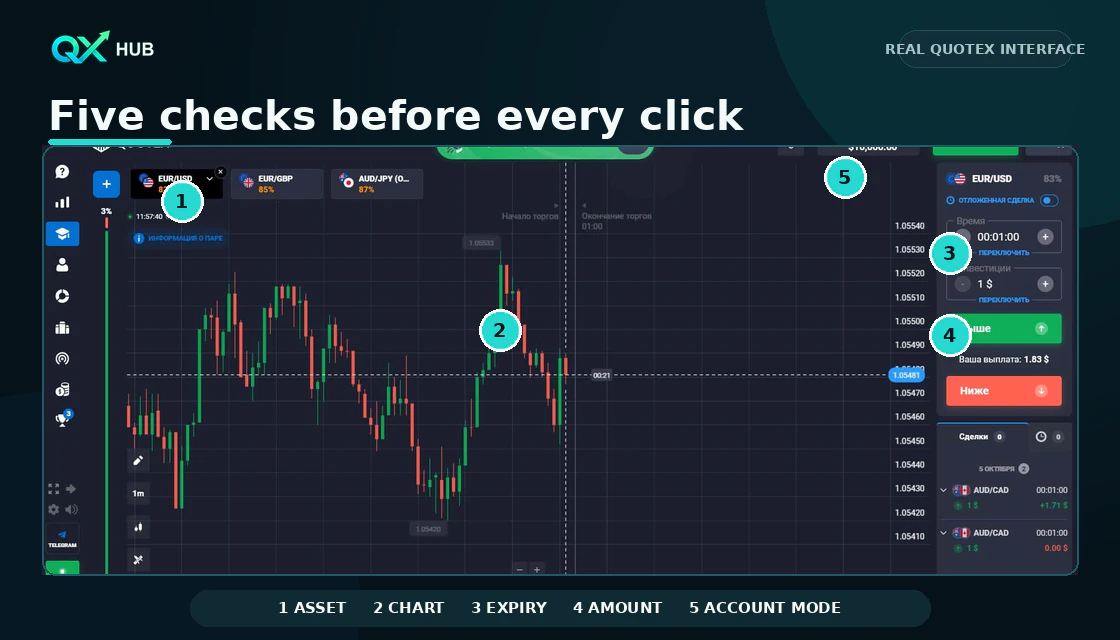
- Learn the interface in demo mode and verify the asset, stake, expiry and account mode before every click.
- Treat payout as a current contract condition, not as proof that a trade setup is strong.
- Use fixed small stakes, a written session loss limit and never increase the amount after a loss with Martingale.
- Check the live cashier and current official policy because payment methods, limits and fees can vary by region.
Quick answer
Quotex is easiest to use when every action follows the same order: confirm the official platform and account mode, choose one asset, read the chart, set the amount and expiry, then review the outcome in history. Demo funds help you learn that process, but they do not reproduce the emotions or consequences of real-money trading. Payment methods, limits and availability can vary by region and account, so the live cashier and current platform policies always take priority over an article.
- Learn the interface before trying to trade quickly.
- Check asset, stake, expiry and demo or live mode before every click.
- Treat payout as a condition to compare, not a reason to force a trade.
- Keep receipts and transaction IDs for payment questions.
- Stop the session when the plan is unclear or the loss limit is reached.
Platform and account questions
1. What is Quotex?
Quotex is an online platform for short-term digital contracts. A trader selects an asset, an expiry and a direction. The outcome depends on whether the price finishes above or below the entry level at expiry. This is not the same as buying the underlying stock, currency or cryptocurrency.
2. Is Quotex the same as investing?
No. Traditional investing usually means owning an asset for a longer period. A short-duration digital contract is a speculative decision with a fixed outcome structure and can lose the full stake. Use separate goals and separate risk rules.
3. How do I find the official platform?
Use a route you have verified, check the domain carefully and avoid links sent by unknown contacts. Never share passwords, one-time codes or remote access. Availability and legal restrictions depend on the user’s country.
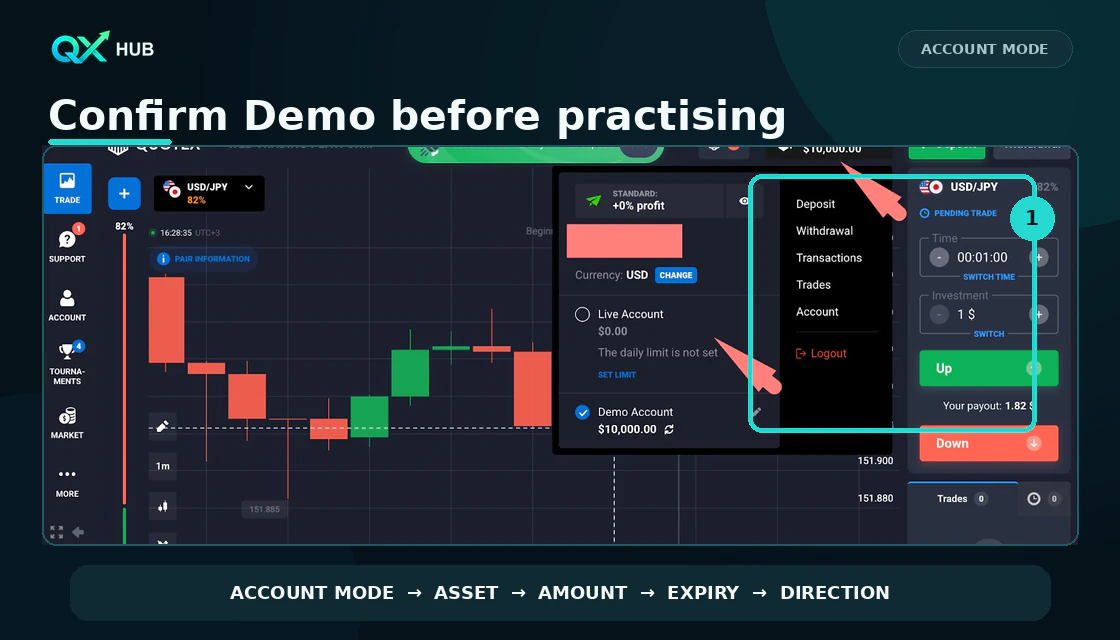
4. What is the difference between demo and live mode?
Demo mode uses virtual funds and is suitable for learning navigation, timing and record keeping. Live mode uses deposited money and introduces real loss, execution and emotional pressure. A setup that looks comfortable on demo still needs conservative live risk.
5. Can I use Quotex on a phone?
The official site says the platform is optimized for modern computers and mobile devices and mentions a browser version and Android app. A larger screen is usually clearer for analysis; mobile is better for a planned check than for impulsive entries.
6. What should I check after login?
Confirm the account mode, displayed balance, selected asset, platform time and any account notifications. If anything looks unfamiliar, stop and verify the route before entering personal or payment information.
How the trading screen works
7. What does the asset selector do?
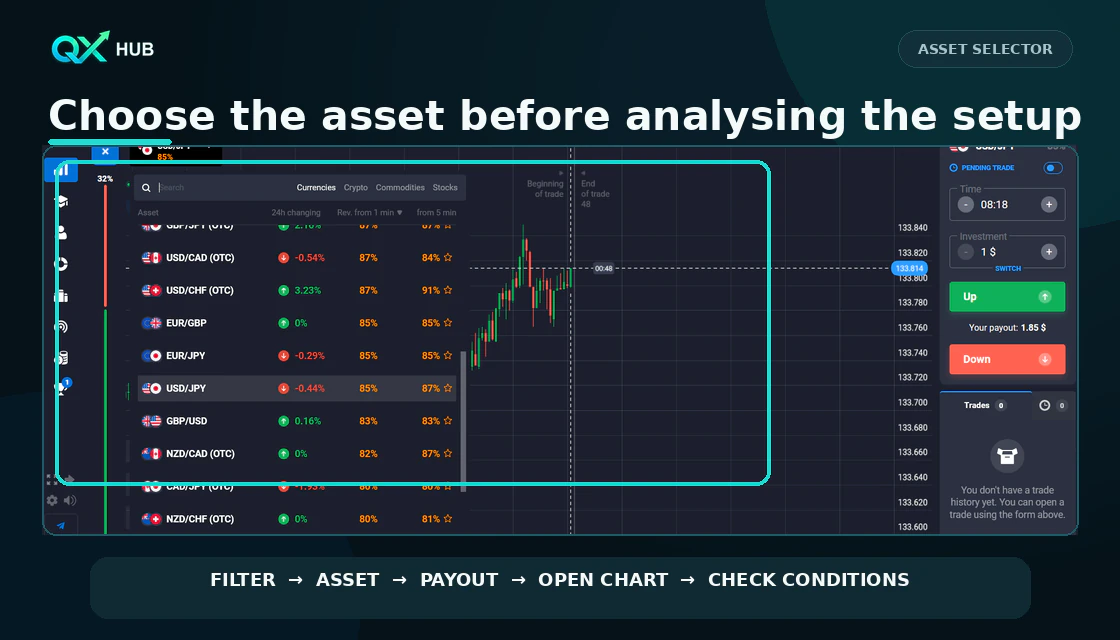
It changes the market shown on the chart. Availability and return percentage can differ by time and asset. Choose the market first, then analyse it; do not build a setup on one chart and accidentally trade another.
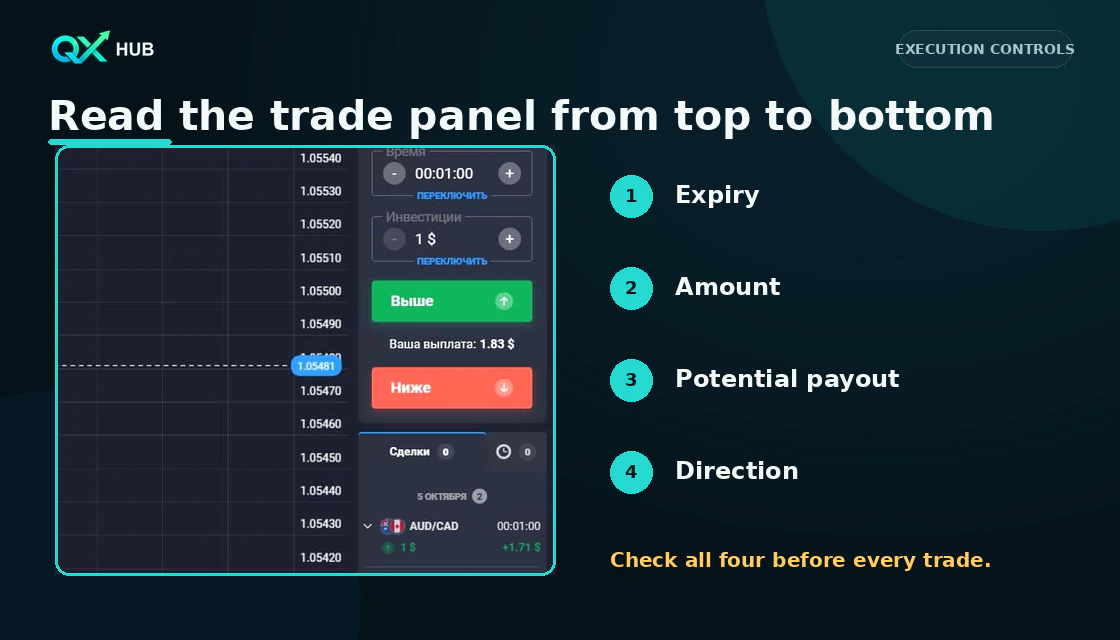
8. What does payout percentage mean?
It is the displayed potential return for a successful contract under the current conditions. It can change. A high percentage does not make a weak setup better, and it does not reduce the probability of losing the stake.
9. Which chart type should a beginner use?
Candlesticks usually show the open, high, low and close more clearly than a simple line. Use a timeframe that lets you see structure without reacting to every small movement.
10. Which indicators are available?
The platform can provide common technical tools such as moving averages, RSI, MACD and Bollinger Bands. Availability may change. One trend tool plus one confirmation tool is usually easier to read than a chart covered with overlapping indicators.
11. What is expiry time?
Expiry is the moment when the contract is evaluated. It is not a profit target. The expiry should match the speed of the setup and the chart context; changing it after analysis changes the trade idea.
12. What does the amount field control?
It controls the stake at risk on that contract. Set it before choosing direction. A beginner should use a fixed, small practice amount and a written daily stop rather than increasing size after a loss.
Placing and reviewing a trade
13. How do I place a demo trade?
Choose one liquid, readable asset. Write the setup, set a small virtual stake, choose an expiry that fits the idea, confirm Demo account, then select direction only after the checklist passes. Record the screenshot and outcome.
14. What do Up and Down mean?
Up expresses the expectation that the expiry price will finish above the entry price; Down expresses the expectation that it will finish below. The exact platform result is determined by the contract rules and quoted prices.
15. Can I close a trade early?
Do not assume early closure is available or advantageous. Check the controls and current contract terms inside the platform before entry. Plan as if the stake must remain exposed until expiry.
16. Where can I see open and completed trades?
Use the trade history or order area to review active positions and final results. Record asset, entry time, expiry, stake, setup, screenshot and whether every rule was followed.
17. Why can my chart differ from another website?
Price feeds, aggregation and timestamps can differ between providers. Compare the same instrument and time, and judge the contract using the platform’s stated quote source and rules rather than a random external screenshot.
18. What should I do after a losing trade?
Do not immediately increase size or switch assets. Mark whether the setup was valid, whether execution matched the plan and whether the market condition changed. Stop when the daily limit is reached.
Strategy risk and practice
19. Is there a guaranteed Quotex strategy?
No. Indicators and patterns describe conditions; they do not guarantee the next price. Claims of guaranteed accuracy or risk-free profit are a reason to leave, not a reason to deposit.
20. How many indicators should I use?
Use only enough to answer distinct questions. For example, a moving average can describe trend and RSI can describe momentum. Two indicators that calculate similar information can create false confidence.
21. How much should I risk per trade?
There is no universal safe number. Set a stake small enough that several losses do not change your behaviour, cap total session loss and never use money needed for living expenses. Demo-test the rule first.
22. Is Martingale safe?
No. Increasing the stake after losses can grow exposure rapidly and a normal losing sequence can erase an account. Fixed small sizing and a hard session stop are easier to control.
23. When should I skip a trade?
Skip when the chart is unclear, payout changes the decision, the expiry does not match the setup, major news is near, the platform is unstable or you feel pressure to recover a loss.
24. How should I practise?
Run a sample of at least 20 to 30 demo trades with one setup and fixed rules. Judge rule-following, not just wins. Change one variable at a time, then repeat the sample.
Deposits withdrawals and verification
25. What is the minimum deposit?
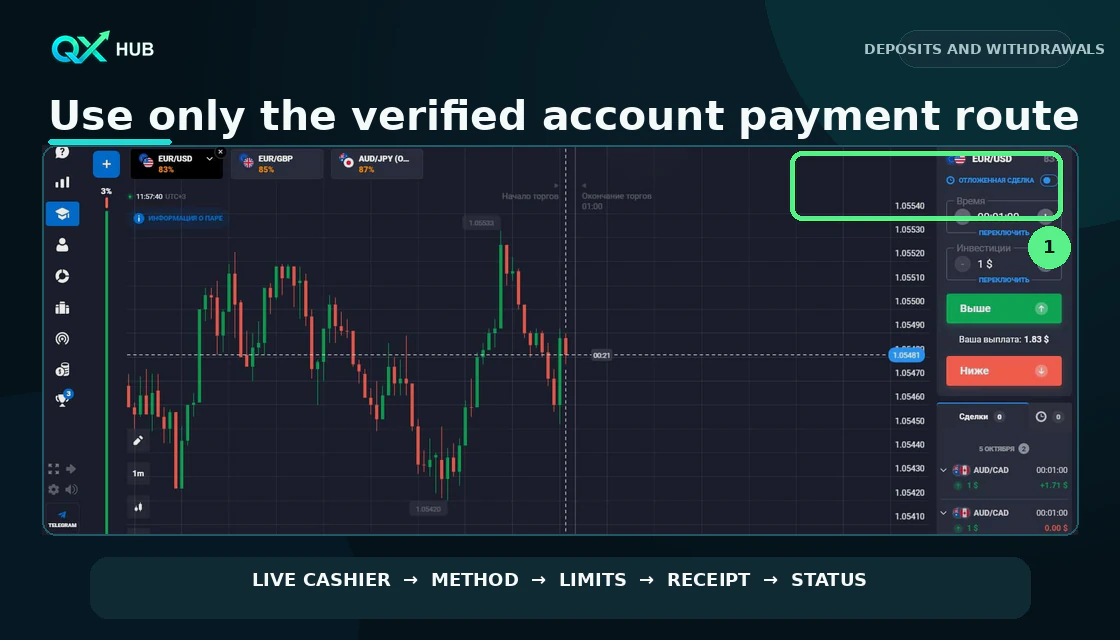
The official Quotex site has listed a 10 USD minimum deposit, but methods, currencies and limits can vary. Check the live cashier before publishing or acting on a number because current account terms override older articles.
26. Does Quotex charge deposit or withdrawal fees?
Official Quotex FAQ wording differs by locale and can change. Deposits are generally described as free, while some localized FAQ versions state that a 3% fee may apply from the third withdrawal made on the same day. Payment providers may also charge fees or conversion spreads. Treat the amount shown in the live cashier and the current payment policy as controlling before confirming.
27. How long does a withdrawal take?
The official site describes a general processing range of one to five days, depending on current volume. Region, method, verification and provider processing can affect the actual time. Check live status before escalating.
28. Why might verification be requested?
Platforms may request identity or address documents to confirm account ownership and meet payment or compliance requirements. Upload only through the verified account area, use clear unedited documents and make sure account data matches.
29. What if my preferred withdrawal method is unavailable?
Availability can depend on region, prior deposit method, provider and regulatory or technical restrictions. Review the payment policy and options shown in the account, keep evidence and contact official support rather than an intermediary.
30. What should I send support?
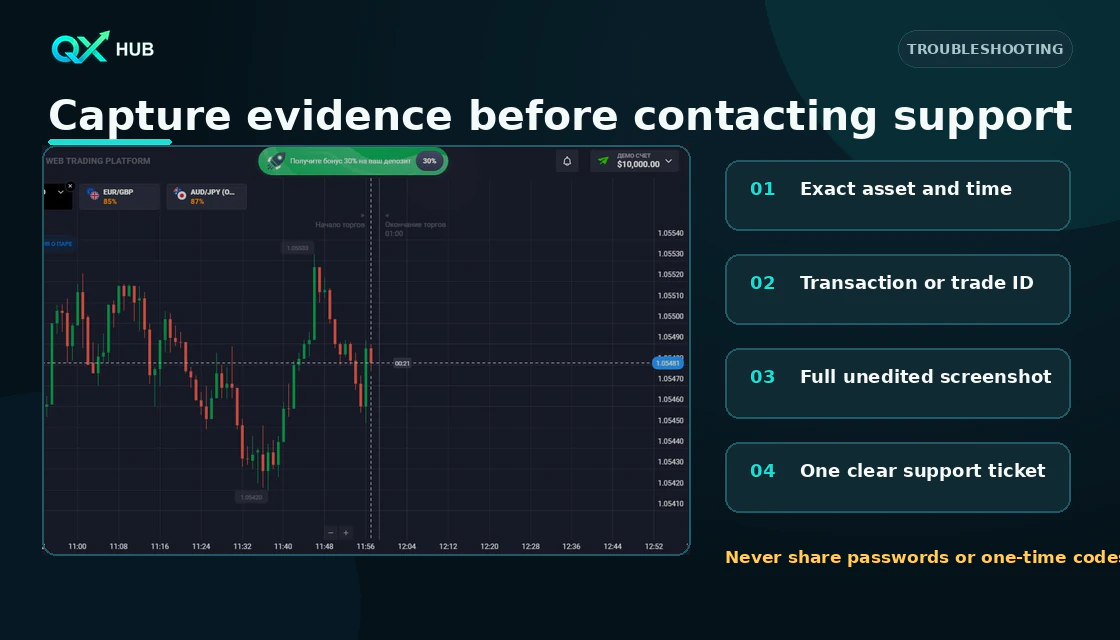
Use one concise ticket with the category, account email, time, amount, payment method, transaction or withdrawal ID, status and unedited evidence. Never include a password, one-time code or full card credentials.
Troubleshooting checklist
- Login issue: verify the domain, check email access and use the official password-reset route.
- Deposit missing: confirm provider status, save the receipt and transaction ID, then use the correct support category.
- Withdrawal pending: check the stated processing window, account messages and verification requests.
- Chart or quote concern: record asset, exact time, expiry and screenshot; compare like for like.
- App issue: update from the verified source, restart the session and avoid trading through an unstable connection.
Pre trade checklist
- Official route and secure connection confirmed.
- Demo or live account mode confirmed.
- Asset and current conditions checked.
- Stake and total session loss limit written.
- Expiry matches the tested setup.
- No imminent news or unstable platform behaviour.
- Screenshot and journal fields ready.
- A specific reason to skip is defined.
Quick answers
1. What is Quotex?
Quotex is an online platform for short-term digital contracts. A trader selects an asset, an expiry and a direction. The outcome depends on whether the price finishes above or below the entry level at expiry. This is not the same as buying the underlying stock, currency or cryptocurrency.
2. Is Quotex the same as investing?
No. Traditional investing usually means owning an asset for a longer period. A short-duration digital contract is a speculative decision with a fixed outcome structure and can lose the full stake. Use separate goals and separate risk rules.
3. How do I find the official platform?
Use a route you have verified, check the domain carefully and avoid links sent by unknown contacts. Never share passwords, one-time codes or remote access. Availability and legal restrictions depend on the user’s country.
4. What is the difference between demo and live mode?
Demo mode uses virtual funds and is suitable for learning navigation, timing and record keeping. Live mode uses deposited money and introduces real loss, execution and emotional pressure. A setup that looks comfortable on demo still needs conservative live risk.
5. Can I use Quotex on a phone?
The official site says the platform is optimized for modern computers and mobile devices and mentions a browser version and Android app. A larger screen is usually clearer for analysis; mobile is better for a planned check than for impulsive entries.
6. What should I check after login?
Confirm the account mode, displayed balance, selected asset, platform time and any account notifications. If anything looks unfamiliar, stop and verify the route before entering personal or payment information.
7. What does the asset selector do?
It changes the market shown on the chart. Availability and return percentage can differ by time and asset. Choose the market first, then analyse it; do not build a setup on one chart and accidentally trade another.
8. What does payout percentage mean?
It is the displayed potential return for a successful contract under the current conditions. It can change. A high percentage does not make a weak setup better, and it does not reduce the probability of losing the stake.
9. Which chart type should a beginner use?
Candlesticks usually show the open, high, low and close more clearly than a simple line. Use a timeframe that lets you see structure without reacting to every small movement.
10. Which indicators are available?
The platform can provide common technical tools such as moving averages, RSI, MACD and Bollinger Bands. Availability may change. One trend tool plus one confirmation tool is usually easier to read than a chart covered with overlapping indicators.
11. What is expiry time?
Expiry is the moment when the contract is evaluated. It is not a profit target. The expiry should match the speed of the setup and the chart context; changing it after analysis changes the trade idea.
12. What does the amount field control?
It controls the stake at risk on that contract. Set it before choosing direction. A beginner should use a fixed, small practice amount and a written daily stop rather than increasing size after a loss.
13. How do I place a demo trade?
Choose one liquid, readable asset. Write the setup, set a small virtual stake, choose an expiry that fits the idea, confirm Demo account, then select direction only after the checklist passes. Record the screenshot and outcome.
14. What do Up and Down mean?
Up expresses the expectation that the expiry price will finish above the entry price; Down expresses the expectation that it will finish below. The exact platform result is determined by the contract rules and quoted prices.
15. Can I close a trade early?
Do not assume early closure is available or advantageous. Check the controls and current contract terms inside the platform before entry. Plan as if the stake must remain exposed until expiry.
16. Where can I see open and completed trades?
Use the trade history or order area to review active positions and final results. Record asset, entry time, expiry, stake, setup, screenshot and whether every rule was followed.
17. Why can my chart differ from another website?
Price feeds, aggregation and timestamps can differ between providers. Compare the same instrument and time, and judge the contract using the platform’s stated quote source and rules rather than a random external screenshot.
18. What should I do after a losing trade?
Do not immediately increase size or switch assets. Mark whether the setup was valid, whether execution matched the plan and whether the market condition changed. Stop when the daily limit is reached.
19. Is there a guaranteed Quotex strategy?
No. Indicators and patterns describe conditions; they do not guarantee the next price. Claims of guaranteed accuracy or risk-free profit are a reason to leave, not a reason to deposit.
20. How many indicators should I use?
Use only enough to answer distinct questions. For example, a moving average can describe trend and RSI can describe momentum. Two indicators that calculate similar information can create false confidence.
21. How much should I risk per trade?
There is no universal safe number. Set a stake small enough that several losses do not change your behaviour, cap total session loss and never use money needed for living expenses. Demo-test the rule first.
22. Is Martingale safe?
No. Increasing the stake after losses can grow exposure rapidly and a normal losing sequence can erase an account. Fixed small sizing and a hard session stop are easier to control.
23. When should I skip a trade?
Skip when the chart is unclear, payout changes the decision, the expiry does not match the setup, major news is near, the platform is unstable or you feel pressure to recover a loss.
24. How should I practise?
Run a sample of at least 20 to 30 demo trades with one setup and fixed rules. Judge rule-following, not just wins. Change one variable at a time, then repeat the sample.
25. What is the minimum deposit?
The official Quotex site has listed a 10 USD minimum deposit, but methods, currencies and limits can vary. Check the live cashier before publishing or acting on a number because current account terms override older articles.
26. Does Quotex charge deposit or withdrawal fees?
Official Quotex FAQ wording differs by locale and can change. Deposits are generally described as free, while some localized FAQ versions state that a 3% fee may apply from the third withdrawal made on the same day. Payment providers may also charge fees or conversion spreads. Treat the amount shown in the live cashier and the current payment policy as controlling before confirming.
27. How long does a withdrawal take?
The official site describes a general processing range of one to five days, depending on current volume. Region, method, verification and provider processing can affect the actual time. Check live status before escalating.
28. Why might verification be requested?
Platforms may request identity or address documents to confirm account ownership and meet payment or compliance requirements. Upload only through the verified account area, use clear unedited documents and make sure account data matches.
29. What if my preferred withdrawal method is unavailable?
Availability can depend on region, prior deposit method, provider and regulatory or technical restrictions. Review the payment policy and options shown in the account, keep evidence and contact official support rather than an intermediary.
30. What should I send support?
Use one concise ticket with the category, account email, time, amount, payment method, transaction or withdrawal ID, status and unedited evidence. Never include a password, one-time code or full card credentials.
Next step
Choose a topic by task: brokers for platform selection, guides for access, strategies for setups, risk for discipline and investing for longer market logic.